
Best Productivity Platforms for Work and Daily Tasks
Long to-do lists can turn motivation into stress. Small tweaks via trusted productivity platforms make everyday tasks smoother, showing real results in your workflow and energy.
Choosing the right productivity platforms can mean finishing reports on time, collaborating easily, or keeping your meetings focused. Reliable tools let you get more done with less frustration.
Read on and discover step-by-step recommendations, easy comparison charts, and habits you can use today—each rooted in real scenarios. This guide helps you reshape how work fits your daily rhythm.
Streamlined Workflows Begin With the Right Digital Foundation
Selecting productivity platforms that match real work needs eliminates guesswork when sharing files, managing calendars, and setting reminders in busy teams or solo routines.
Building a strong foundation starts with clarity: make digital tools accountable for daily routines and projects, so you never wonder, “What’s next?” Manage priorities early and often.
Designing a Morning Routine for Efficiency
Set one notification from your productivity platforms to check priority messages and calendar invites at breakfast. Skipping noisy, redundant alerts preserves your energy for the day’s big goals.
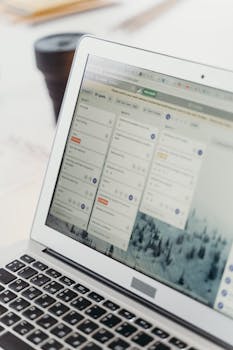
Look at a neatly organized dashboard—colored priorities or deadlines—rather than scanning email chaos. This gives visual confidence and helps keep valuable time for your own agenda.
If you use one master planning app integrated with email and calendar, you can leave the house knowing, “I’ve already handled what matters most for today.”
Project Tracking for Team Accountability
Teams using shared productivity platforms quickly assign tasks, view progress with real-time updates, and cut status meetings in half. Tagging a teammate gives them clear next steps instantly.
Team members can comment directly on tasks with questions or quick confirmations, reducing scattered chat threads. Body language changes—shoulders relax—when everyone knows who owns what.
The project owner opens a dashboard, marks blockers with a red flag, and triggers a notification only to people affected. Focus sharpens, and the workflow stays on track.
| Platform | Strength | Best For | Action Step |
|---|---|---|---|
| Trello | Visual Boards | Task Organization | Create three lists: To Do, Doing, Done—move cards every morning |
| Asana | Workflow Automation | Teams | Assign all tasks with clear deadlines; review weekly on Fridays |
| Notion | Flexible Notes | Personal Projects | Link daily notes with ongoing project boards for visibility |
| ClickUp | All-in-One Tasks | Multi-project Oversight | Build a dashboard showing due dates, priorities, and reminders |
| Todoist | Simplicity | Individual | Enter top 3 tasks for each day every morning, check off as completed |
Sustainable Personal Routines Passed Through Digital Tools
Building sustainable personal routines means crafting habits directly within your favorite productivity platforms. Automate, schedule, and repeat tasks to lighten your mental load every week.
Look beyond flashy features—search for platforms with recurring task settings or gentle prompts that nudge routines without overwhelming you. Your mornings and evenings get easier instantly.
Automating Home Tasks Using Productivity Platforms
Set recurring grocery reminders in your preferred app on Thursday evenings. You’ll avoid the Friday rush and always have time for healthy meal prep over the weekend.
Schedule a “pay bills” recurring task each month. Checking it off feels plus a real win, so finances stay tidy and you avoid last-minute stress with just a single click.
- Create daily routines by setting recurring reminders: This ensures nothing is forgotten while freeing up brainpower for creative tasks or surprises that pop up.
- Batch similar tasks on your favorite productivity platforms: Handle all emails in one block, then move to focused writing. Switching less means fewer mistakes and a calmer mind.
- Prioritize sleep or relaxation: Add evening “wind down” and gratitude log reminders to help mark a healthy boundary between work and downtime every night.
- Make workouts actionable: Add two weekly exercise blocks to your schedule; add notes for “yoga” or “walk in park” for a simple, approachable plan.
- Review routines weekly: Check your recurring tasks and adjust what didn’t get done, using in-app analytics or a simple checklist view.
Building these micro-habits on productivity platforms day by day transforms overwhelming routines into manageable, repeatable steps that support your long-term goals.
Tracking Habits for Consistency and Motivation
Activate a simple daily habit tracker within your main platform. Each checkmark brings a little hit of satisfaction, turning routines into friendly competitions with yourself.
Visual graphs that grow as you stick to habits reinforce your progress more than mere reminders. Motivation comes from seeing steady improvement over time, not just from to-do lists.
- Add “hydrate” and “stretch” to your habit tracker: These micro-actions support energy and reduce stiffness, and the digital record keeps you honest each day.
- Use streak features to build momentum: Seeing an unbroken line of wins compels you to keep at it, even if you want to skip the occasional day.
- Invite a friend or partner to join your platform: Light social accountability pushes you to keep up with healthy habits and keeps the process social and positive.
- Celebrate wins: Use in-app confetti or rewards for milestones, like five days straight of reading at bedtime. Celebrate, then reset the streak to build further.
- Adjust as you learn: If a habit never gets checked off, rephrase it or lower the bar. Platforms allow for quick edits, so keep your rules achievable.
With consistent reflection and smart habit design, the right productivity platforms help you transform daily actions into dependable, life-improving routines.
Managing Team Collaboration for Clear Outcomes and Swifter Decisions
When workflows are visible to everyone, projects feel less like mystery tours. The best productivity platforms give all team members access to dashboards so decisions get made quickly and transparently.
Color-coded boards, live notifications, and assignable checklists show where projects stand. This eliminates double-work and minimizes confusion, ensuring someone always knows who needs to step up next.
Pinpointing Blockers and Setting Priorities Together
At the start of a big project, assign one “blockers” column where all team members flag open issues. The project leader checks it each morning and sets priority on what’s needed to advance.
Instead of asking aimless questions, teammates post updates using shared platforms using scripts like: “Issue: waiting on client feedback for Section B. ETA received by Friday.” No time is wasted.
This gentle boundary—”if it’s not on the board, it doesn’t exist”—turns ambiguity into action. Decisions are quick and clear, with minimal back-and-forth, keeping everyone focused.
Celebrating Wins and Documenting Lessons Learned
Each time a big milestone finishes, team members flag the card as “done” and add a brief success comment. Team chat fills with “Great work!” GIFs and positive emojis—it feels rewarding and real.
In review meetings, team leads assign a quick “retrospective” task. Everyone notes what worked and what to improve next time. Honest feedback shapes the next project process immediately.
Post-mortems, logged in the platform itself, become a living source of learning—future team members study old successes and lessons without digging through old emails or scattered documents.
Integrating Work and Life on Productivity Platforms Seamlessly
Blending work projects and daily home chores inside one dashboard means less context switching and lower stress. The top productivity platforms allow you to keep all personal and professional tasks visible in a single place.
Drag-and-drop features let you rearrange urgent work meetings next to family reminders—say, “Client call 11 a.m.” above “soccer pickup 3:30 p.m.” This keeps you responsive across all life areas.
Color Coding for Work-Life Balance Clarity
Assign color codes: red for deadlines, green for personal, blue for meetings. With a quick glance, your platform’s calendar shows if your days tilt toward work or well-being.
Reschedule or swap slots the minute your color balance feels skewed. For example, a blue-blocked Thursday signals too many meetings. Move one, create space for focus, and avoid fatigue.
This visual cue helps you stay honest about commitments. If friends ask, “Are you really free Friday?” check your board and answer with confidence, not uncertainty.
Sharing Access With Family and Colleagues
Add a partner as a guest to your grocery or chore list. They grab things after work and mark items done, reducing repeat texts and surprise errands at dinner time.
For shared work projects, invite an assistant to view your weekly priorities. They see gaps and can offer help on overbooked days before problems arise, saving time and energy.
Shared access ensures everyone updates in real-time and keeps responsibility visible. No more—I didn’t know!—excuses delay outcomes. Everyone can plan around accurate, collaborative information.
Customizing Productivity Platforms to Fit Your Unique Style
Productivity platforms offer a vast array of templates, integrations, and flexible views so you can shape them to your habits instead of forcing cookie-cutter solutions.
Taking time to tailor your platform with tailored labels, themes, and widgets increases the motivation to use it, and helps you build systems that truly work for you every day.
Creating Personal Templates and Dashboards
Instead of blank lists, design a morning template: “Email sweep, priority check, creative hour, admin block.” Make it repeatable—a single click builds your daily plan in seconds.
Apply a project template for recurring tasks like content production or event planning. Use pre-set stages (“idea, draft, edit, publish”) so each step is ready to go when you are.
Custom widgets—weather, focus timer, hydration counter—show up alongside tasks, reminding you of self-care and priorities at a glance without switching apps.
Experimenting With Integrations and Automation
Link your main productivity platforms to email or cloud storage. This pulls files and communications directly into project boards—no more lost attachments or manual uploads.
Set up calendar syncing: when someone sends a meeting request, it appears on your work and personal dashboards at once, so you never double-book or miss a call.
Experiment with automation rules—”when I add a new event, create a follow-up task 48 hours later.” These save steps and keep your priorities moving even when you get busy.
Building Long-Term Success With Productivity Platforms
Using productivity platforms with intention creates positive habits that stick far beyond a single day or project, laying a strong groundwork for lasting work satisfaction and life balance.
Review performance every month by scanning platform analytics or completed task reports. This shows patterns: where you excel and what routines need refinement for smoother workflows next month.
Share highlights with your team or family, celebrating progress and evolving routines. Group check-ins can reinforce accountability and keep shared motivation high over the long haul.
Bringing It All Together for Smarter, Calmer Workdays
The most effective productivity platforms fit the shape of your work and life, not the other way around. Ease and improvement come from focusing on habits, not just the number of tasks completed.
Explore flexible features, set routines that adapt to you, and invite others for feedback or accountability. Each tweak brings work and daily chores closer to enjoyable, balanced outcomes.
Replace chaos with a customized digital system. One step at a time, productivity platforms can turn long to-do lists into routines you feel proud to finish.


